You’ve written a skill, or you’re about to. Then someone tells you not to bother — just install the plugin. And now there are two words for what sounds like the same thing, on both platforms, in menus sitting next to each other.
They aren’t the same thing, and the difference holds in one line:
A skill is one capability. A plugin is a box you can put several in.
That’s the whole distinction. The rest of this is what goes in the box, why the box exists at all, and how to tell which one you need — including the case where the answer is neither.
The shape of it
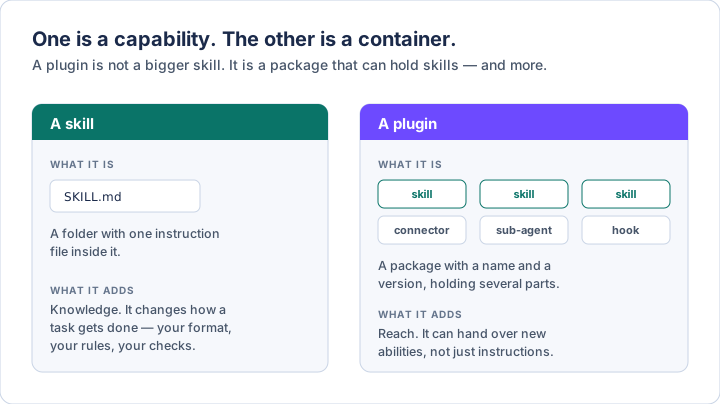
The sentence worth carrying away from that picture: a skill changes how something gets done. A plugin can change what the assistant is able to reach.
A skill is instructions. However good they are, they can’t open a connection to your email — instructions don’t grant access to anything. A plugin can carry that connection along with the instructions, which is most of why it exists.
A skill, briefly
Covered properly in How to build your own AI skill, so the short version here.
A skill is a folder containing a Markdown file called SKILL.md: a few lines of
metadata, then your instructions. Optionally some reference material alongside
it. There’s nothing to install and nothing to compile, and the format is a
genuine open standard both Anthropic and OpenAI have adopted, so one written for
Claude generally runs in ChatGPT and Codex too.
Two properties matter for what follows. Only the description is always in
view — the body loads when the skill is actually used, so a long, specific
skill costs almost nothing until you need it. And it triggers itself: you
describe the task in ordinary words and the right instructions load, or you call
it by name (/name in Claude Code, $name in Codex, @name in ChatGPT).
A plugin, and what’s in it
A plugin is a package. It has a name, usually a version number, and it holds parts. You install it in one step and everything inside arrives at once.
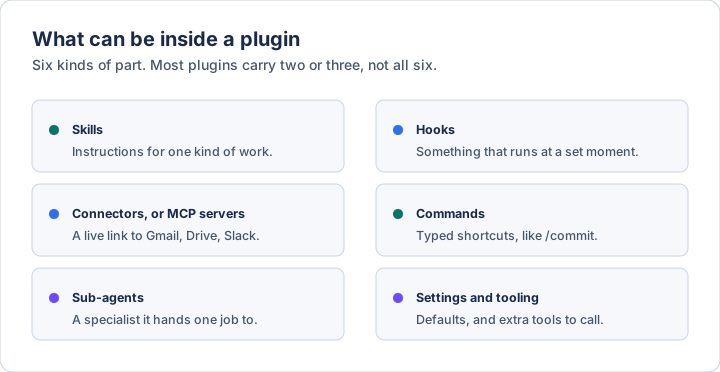
In plain terms:
- Skills — the instructions, exactly as described above. A plugin can carry one or twenty.
- Connectors, also called MCP servers — the live link to an outside service. This is the part a skill can’t do on its own. Gmail, Drive, Slack, GitHub, Notion, Figma.
- Sub-agents — a specialist the assistant can hand one job to and get an answer back from, without the whole conversation going sideways.
- Hooks — something that runs automatically at a set moment. After every file edit, before every commit. You don’t ask for it; it just happens.
- Commands — typed shortcuts. Mostly the same thing as skills now, kept because plenty of existing ones were written that way.
- Settings and tooling — defaults the plugin turns on, and extra tools it makes available.
Most plugins are not a full set of six. The GitHub plugin is essentially one connector. A commit plugin is essentially a few skills. The box is just big enough to hold whatever the thing needs.
Why the box exists
Four reasons, in rough order of how much they’ll matter to you.
One install instead of six. A working set-up for a piece of work is usually several pieces — the connection to the service, the instructions for using it well, a shortcut or two. Assembling that yourself is an afternoon. Installing it is a click.
It can be updated. A plugin comes from a marketplace and carries a version, so the author can fix something and you get the fix. A folder someone emailed you is frozen the moment it lands.
Nothing collides. Skills inside a plugin are prefixed with the plugin’s
name — /plugin-name:skill-name — so two plugins can both ship a “review” skill
without fighting. That’s the entire reason for those slightly ugly compound
names.
It can carry what a skill can’t. Connections, sub-agents, hooks. If what you need is access rather than instructions, a skill was never the answer.
Which one you need
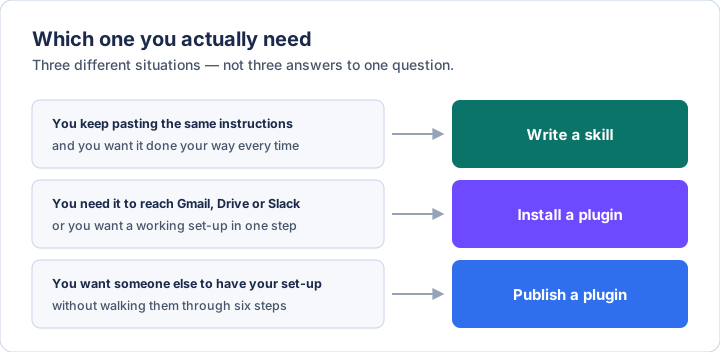
Write a skill when the thing you want is your own judgment, written down. How you like a summary structured. The check you run before sending anything. Nobody will ever publish a plugin for how you want your weekly update written, and the whole value of a personal skill lives in the parts only you would specify.
Install a plugin when you need reach — something that touches a service outside the assistant — or when you want a working set-up without building it. This is also the honest answer for most people most of the time: the useful plugins are the ones connecting you to a tool you already use.
Publish a plugin when you want someone else to have your set-up in one step rather than six. A plugin can be as small as one skill and a short manifest file, so this is a much lower bar than it sounds. If you find yourself writing installation instructions for a colleague, that’s the signal.
The honest limit: a plugin doesn’t make the skills inside it any better. Same instructions, same output. It’s a delivery mechanism, not an upgrade. If a skill was vague, wrapping it in a plugin ships the vagueness to more people.
Where each one lives
Both companies have arrived at roughly the same shape, from opposite directions, which makes this easier to hold in your head than it was a year ago.
Claude, in chat and in Cowork. Skills go in Customize → Skills. Plugins go in Customize → Plugins → Browse plugins, which opens Anthropic’s directory. Both are on the paid plans. Once a plugin is installed, the skills inside it are available in chat on the web, in the Chat tab of the desktop app, and in Cowork.
Claude Code. Skills are just directories — drop a folder in
~/.claude/skills/ for everywhere, or a project’s .claude/skills/ to keep it
local. Plugins have their own manager: type /plugin for a browsable panel, or
install directly:
/plugin install github@claude-plugins-official
The official Anthropic marketplace is registered for you the first time you start Claude Code. There’s a community one you add yourself, and a marketplace can also just be a Git repository, which is how most people distribute their own. When you install, you choose a scope: yourself everywhere, yourself in this project only, or everyone who works in that repository.
In the desktop app’s Code tab there’s no terminal needed — the + button next to the prompt box has a Plugins entry, and Add plugin opens the browser. Worth knowing: that browser isn’t available in cloud sessions, where plugins have to be declared in the repository’s settings file instead.
ChatGPT and Codex. Same idea, same word. A plugin there bundles skills, connectors, MCP servers, and a few things Claude’s don’t have — browser capabilities, hooks, and templates for scheduled tasks. They’re available with ChatGPT Work on the web, and with Work or Codex in the desktop app; the Codex CLI has its own plugin browser. They are not in the ordinary Chat mode, the IDE extension, or on mobile, which is the part most likely to catch you out. The directory splits into tabs for OpenAI’s own plugins, your workspace’s, and personal ones.
While we’re here: these aren’t the 2023 ChatGPT plugins
If you tried “ChatGPT plugins” three years ago and formed a view, set it aside. That system — the one with the plugin store, in 2023 — was retired in 2024: no new chats from 19 March, switched off entirely on 9 April, and replaced by custom GPTs. Most of what those plugins did is now simply built in.
Today’s plugins are a different thing that happens to have inherited the name. The old ones were a way for a website to bolt itself onto a chatbot. The new ones are a way to package instructions, access, and configuration together. Same word, almost no overlap.
What installing one actually costs you
None of this is money. All three are worth knowing before you go shopping.
Context. Every enabled plugin puts something in front of the assistant on every turn — at minimum, a line describing each skill it carries. Claude Code shows you a context cost estimate in the plugin’s details before you install, alongside a will install list of exactly what’s in the box. Read both. Ten plugins you installed once make the two you rely on measurably less reliable, which is the same failure mode as collecting skills, one size up.
Attention. Claude Code now groups plugins you haven’t used in a couple of weeks under a not used recently heading, which is a quietly useful nudge. Take it. Disabling something is reversible; the cost of leaving it on isn’t visible until you go looking.
Trust, and this is the real one. A skill is instructions your assistant reads. A plugin can execute code on your machine with your privileges, open connections to your accounts, and run hooks you never explicitly triggered. Anthropic’s own wording is blunt: plugins and marketplaces are highly trusted components, and you should only install from sources you trust.
That asymmetry is worth stating plainly. A bad skill gives you a bad draft. A bad plugin can run code. The reading habit from installing a skill someone sent you applies here with more force, not less: who wrote it, what’s in the box, what does it reach. Official and reviewed marketplace listings are a genuinely different proposition from a repository URL someone pasted into a chat.
Three ways this goes wrong
Installing a plugin for something you could have written in ten minutes. A listing in a directory looks more authoritative than a text file you wrote yourself. It usually isn’t, and for anything involving your own taste it definitely isn’t.
Building a plugin when you needed a skill. Manifest, version, marketplace,
distribution — all of that is machinery for getting something to other people. If
the only person using it is you, it’s a folder in ~/.claude/skills/ and you’re
already finished.
Assuming the plugin includes the judgment. A connector gets the assistant into your email. It has no opinion about which messages matter or how you write. That part is still a skill, and it’s still yours to write — which is the reason the two things exist separately at all.
Keeping this current
This is one of the faster-moving corners of both products, and the words are still settling. Menu names will drift before the concepts do; when the screen disagrees with this page, believe the screen:
- Claude, skills: code.claude.com/docs
- Claude, finding and installing plugins: code.claude.com/docs
- Claude, building a plugin: code.claude.com/docs
- Claude, plugins in chat and Cowork: support.claude.com
- ChatGPT and Codex, plugins: developers.openai.com
- The skill format itself: agentskills.io
Written 16 August 2026, and checked against each product’s documentation on that date. Diagrams are original to this post.
If you want the layer underneath this — what these systems actually are, where they fail, and the vocabulary to follow the conversation — The AI Primer is the plain-English version. $23.97.