If you’ve used AI assistants seriously for a year, you’ve already lived through this at least twice. A new model comes out. It’s better. And the set-up you spent a month tuning — the long prompt, the exact phrasing, the trick that stopped it padding everything — behaves slightly differently, in ways you only notice a week later.
The instinct is to start tuning again. The better move is to stop putting your effort into the part that keeps getting replaced.
The model is the part you rent. The folder is the part you own.
That’s the argument of this post. A workflow written down as files and folders survives a model change. A workflow living in a long prompt and your memory of what worked mostly doesn’t.
Where this idea comes from
In March 2026, two researchers — Jake Van Clief and David McDermott — published a paper with an unusually plain title: Interpretable Context Methodology: Folder Structure as Agent Architecture. The claim is simple enough to fit on one line: for a lot of real work, you don’t need an elaborate “multi-agent” system. You need one assistant, a well-organized folder, and plain text files telling it what to do at each step.
Numbered folders are the steps. A short text file in each folder is that step’s instructions. Each step writes its result to a file, you look at it, and the next step picks up whatever you left there.
There’s a detail in the paper that makes the point better than the paper does. Every workspace in it was built and tested on models that, seven months later, are already a generation old. Nothing in the folders mentions them. The folders describe the work, not the model doing it — which is exactly why they still make sense today.
What it looks like
Take something you already do on a schedule. A weekly update, say: messy notes in, a clean summary out. Laid out this way, it becomes a folder like this:
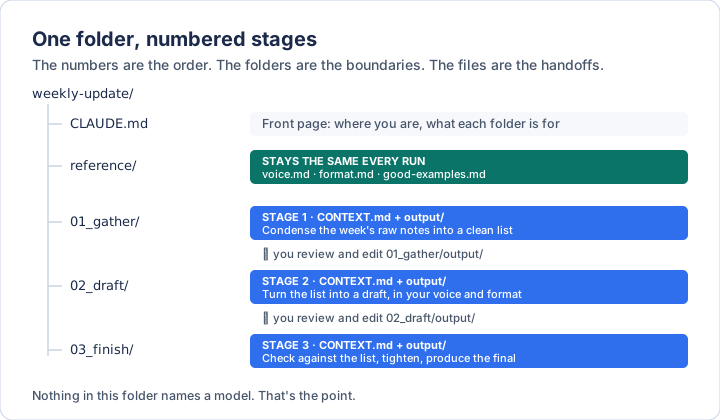
Four kinds of thing are in there, and the distinctions between them are the whole method.
A front page. One short file at the top that tells the assistant where it is
and what each folder is for. Claude Code looks for a file called CLAUDE.md;
Codex looks for AGENTS.md. In Cowork, the project’s instructions box does the
same job. Keep it short — a page, not a manual.
Reference material — the things that are the same every single run. How you write. The format the output has to be in. Two or three examples of your own work that you’d call good. The paper calls this configuring the factory, not the product: you set it up once, and every run after that inherits it.
Numbered stages. Each folder is one step, and the number is the order. Each
has a short instructions file and an output/ folder where its result lands.
Working files — the material for this run. This week’s notes, last stage’s draft. They change every time.
If you’ve already connected a folder using the Context / Projects / Outputs / Templates layout, you’re most of the way here. This is the same idea with one addition: the work itself is broken into steps.
The stage file
Each stage’s instructions file has three parts, and they’re the part worth copying exactly:
## Inputs
- ../01_gather/output/         ← this run's material
- ../reference/voice.md        ← how I write
- ../reference/format.md       ← what the result must look like

## Process
Turn the gathered list into a weekly update.
Follow format.md exactly. Match the tone in voice.md.
Never add a date, number or name that isn't in the list.

## Outputs
- draft.md → output/
Inputs says exactly what to read — and, by leaving everything else off the list, what to ignore. Process is the job, written like a procedure. Outputs says where the result goes, so the next stage knows where to find it.
That last point is what makes it a pipeline rather than a pile of prompts. Stage 2 doesn’t need to be told what stage 1 did. It reads stage 1’s output folder. If you edited that file in between, it reads your edited version.
Why it survives a model change
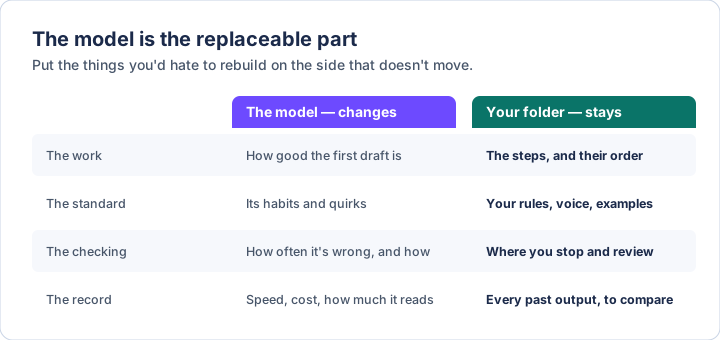
The decisions are written down, not remembered. The valuable part of any workflow is the judgment in it: which steps, in what order, what “good” looks like, what never to do. In a long prompt, that judgment is tangled up with phrasing tricks that only worked on one model. In a folder, it’s in plain sentences any model can read.
Each step is small. A model that’s slightly different from the last one is much less likely to go wrong on “turn this list into a draft in this format” than on one enormous instruction to do everything at once. Small, clearly bounded jobs are the ones that transfer.
It only reads what it needs. This is the paper’s technical argument, and it’s worth understanding. Models do measurably worse when the thing that matters is buried in a long pile of things that don’t — a finding from Stanford researchers in 2023 known as lost in the middle. A single giant prompt holding every step’s instructions and every reference file is that pile. A stage that loads only its own inputs never builds it in the first place.
You can test a new model in an afternoon. This is the practical payoff. When a new model arrives, don’t switch everything over and hope. Re-run one stage with the new model, on last week’s inputs, and put its output next to the old one. Same folder, same instructions, one variable changed. You’ll know within a few runs whether it’s better for your work, which is the only benchmark that matters to you.
It’s yours, and it moves. A workspace is a folder. You can copy it, back it up, or point a different assistant at it entirely. Nothing about it is locked inside one company’s product — the same property that makes skills worth writing.
Where to spend your attention
The paper reports one finding about how people actually use these set-ups that’s worth taking even if you never build one.
Of 33 people running multi-stage workspaces, 30 described the same pattern: they edited heavily after the first stage, barely touched the middle, and edited heavily again at the end.
The reasons are different at each end. The first edit is direction — deciding what this run is actually about, while changing course is still cheap. The last edit is alignment — checking the finished thing still matches the decisions you made at the start. The middle stages sit between two anchors, the direction you set and the reference files constraining them, and there’s less room for them to wander.
So if your review time is limited, spend it at the edges. Get the first output right before anything else runs, and check the last one against it.
The honest limits
The paper is admirably clear about these, so it’s worth being clear too.
The evidence is early. The findings come from conversations with a small, invite-only group of practitioners, not a controlled study, and every workspace was tested on one family of models. Nobody has yet measured, head to head, how much better staged work is than one big prompt. The underlying research on long prompts is solid; the size of the benefit for your own work is something you’ll find out by trying it.
Bigger models may need it less. If future models handle very long inputs without getting worse, the “only read what you need” argument weakens. The other arguments — that you can see every step, edit it, and swap the model — don’t depend on that at all.
It’s for work done in order, with a person checking. Things that need many steps running at once, or decisions made automatically mid-way, or lots of people using the same set-up simultaneously, are what more elaborate systems are for. Between stages, the person deciding what happens next is you.
Build your first one
1. Do the task by hand three times first. Not with an assistant — or at least, not with a set-up. You’re finding out where the natural breaks are. The places you’d stop to check something are your stages.
2. Keep it to three stages. Gather, draft, finish is enough for most things. You can split a stage later when you notice you’re always fixing the same part of it.
3. Write the reference files before the stage files. Your voice, your format, two good examples. This is the slow part, and it’s the part that carries over to every future model and every future workspace.
4. Write each stage’s Inputs, Process and Outputs. Short. A procedure, not an essay — the same advice as for writing a skill, because it’s the same skill.
5. Run it one stage at a time, and read every output. Fix the instruction file, not the output, whenever you can. An edited output fixes this week. An edited instruction fixes every week after.
Three ways this goes wrong
Mixing this week’s material into the reference folder. The distinction between “rules that never change” and “material for this run” is the load-bearing wall. Once last Tuesday’s notes are sitting next to your voice guide, the assistant can’t tell which is which, and neither can you in a month.
Building the structure before you know the work. Ten numbered folders designed in the abstract are worse than three discovered by doing the job. Start small; let the work tell you where to split.
Re-tuning for every new model. The point is that you mostly don’t have to. When a new model behaves differently, first check whether your instructions were ambiguous all along and the old model was just guessing in your favour. Fix the instruction once, in plain words, and it’s fixed for the next model too.
Keeping this current
The method here is deliberately the slow-moving part, but the file names each tool looks for do change. When something doesn’t match, believe the documentation:
- The paper: arxiv.org
- The open-source method and example workspaces: github.com
- Claude Code, how
CLAUDE.mdis read: code.claude.com/docs - Codex and other tools, the
AGENTS.mdconvention: agents.md
Written 3 October 2026. The diagrams are original to this post; the layout they show follows the paper’s method.
If you want the layer underneath this — what these systems actually are, where they fail, and the vocabulary to follow the conversation — The AI Primer is the plain-English version. $23.97.